How to Build the “Imperfect” QA Process

When I got my first QA Engineer job out of college at a small financial company, I did what any new grad would do. I googled “QA process.” Then I googled “what should a QA process look like.” Then I googled “how to build a QA process from scratch.” I read a lot of articles. I got a lot of frameworks with a lot of boxes and arrows.
None of it told me what to actually do on Monday morning.
There’s no shortage of information on the internet about how a QA process should look, but the information overload, and how much they all differed, confused me. I didn’t know if one tutorial was right and the next one was wrong or what. It didn’t help that my small team and leadership didn’t really know either and were dependent on me to be the expert. Eventually, I just picked the major themes and ran with it. I filed bugs because all the articles said so. I built automation because it was everywhere. And that’s how I got trained poorly in what QA is — and it took many years during the Covid pandemic to really open my eyes. You can read about it here.
I get why I was searching for the perfect answer. When you’re the first QA hire at a company that’s never had a QA process, it feels like you’re supposed to have one. Leadership hired you partly because they assumed you’d bring one with you. So you go looking for the canonical, industry-approved version.
Here’s what I know now after working with dozens of companies of all sizes: it doesn’t exist. Every company’s QA process looks different. Not just different tools — different business priorities, different risk tolerance, different relationships between QA and engineering. The process that works at a 500-person company with an outsourced QA team looks nothing like the process that works at a 12-person startup where you’re the only one.
So stop looking for the perfect version. You’re going to build an imperfect one. And that’s fine, because an imperfect process that actually runs is worth ten perfect ones that live in a Google Doc.
What follows is a process that covers the three functional risks that matter most for early-stage companies: making sure new features work correctly, catching regression bugs before users do, and surfacing the edge cases and scenarios that product and engineering didn’t think of. It won’t cover everything. It’s not supposed to. Performance testing, accessibility, internationalization — those matter, but they come later. Right now you need something that ships.
Start By Explaining What You’re Actually There For
Before you define any process, do this: tell the team what QA actually is.
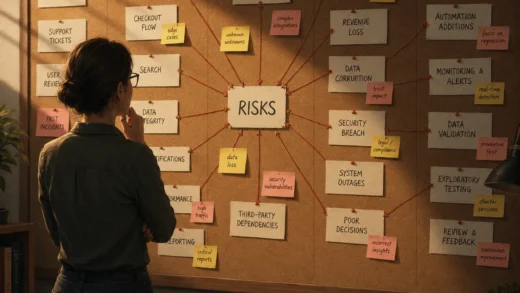
I wrote about this in more depth here, but the short version is: your job is to proactively make risk visible, not just bug finding. Yes, you find bugs. But bug finding is the visible part of the job, and if that’s all the team thinks you do, they’ll treat you like a spell checker at the end of the pipeline. They’ll hand you something when they think they’re done and expect you to stamp it.
That’s the wrong model, and once it sticks you’ll spend the majority of your time filing preventable bugs. So say it out loud early: finding bugs is what happens when making risk visible fails. Your job is what comes before that.
Get In The Room Before Any Code Is Written
Half your job happens before you test anything.
When product and engineering are talking about a new feature — in planning, in design reviews, in whatever your company calls the “figuring out what we’re building” phase — you need to be in that conversation. Not as an observer. As someone asking questions.
Honestly, I have rarely ever been in the room early until my most recent company, and even then it’s always an uphill battle. Product and engineering keep forgetting that QA’s perspective shapes the product and adds value. Even in those conversations the process can be so chaotic that your voice gets drowned out. But it’s always valuable to think about risks early. There were so many times QA wasn’t included and I found out about a feature when it landed in the test environment, already built the wrong way.
Product and engineering are almost always focused on the happy path. They’re thinking about what the feature does when everything goes right. Your job in those conversations is to ask about what happens when things go wrong. The edge cases. The negative paths. The user who does something unexpected. Those questions aren’t annoying — they’re exactly what you’re there for.
The earlier you understand how a feature is supposed to work, the earlier you can start building your test cases. And if you share those test cases with the engineer before they start writing code, they can catch their own bugs before it ever gets to you. That’s the goal. Not finding more bugs in QA, but finding fewer, because they were already handled.
Getting into those early conversations isn’t always automatic. You might have to ask for it. And sometimes the answer is no, or people just forget to include you. If that happens, don’t wait for an invitation. Talk to product and engineers directly, off to the side if you have to. Get your questions answered wherever you can. And if leadership isn’t helping you get what you need, start keeping track of bugs that made it to your test environment — ones that a five-minute design conversation would have caught — and bring that data back when you make the case again.
What You’re Doing While The Engineer Builds
While a ticket is in development, you’re not waiting. You’re working.
You’re building your test cases for that feature. You’re leaving questions in the ticket — Jira, Asana, whatever your team uses — for product or engineering when something is unclear. You’re documenting your testing strategy for that ticket so the engineer knows what you’re going to cover and can sanity-check their own work before they hand it off.
You’re also staying in sync with the engineer as they build. Implementations drift. The feature that was described in planning doesn’t always come out exactly as planned, and you want to know when that’s happening. You’re not policing anything — you’re reassessing risk, because a drifted implementation usually means new risks that you want to flag early.
As the process starts to feel more stable and repeatable, you’ll naturally start looking for places to speed things up. Some of those test cases you’re writing and running every sprint are good candidates for automation. That’s a conversation worth having once the process is running — not on day one.
Testing The Ticket
When the feature lands in your test environment, you’ve already done most of the thinking. Now you’re executing.
Run through three things:
- The acceptance criteria. Does the feature do what it was supposed to do? This is functional correctness. These pass or fail.
- Your additional test cases. The edge cases, negative paths, and scenarios that weren’t in the ACs. These are where you catch the things nobody thought of.
- A targeted regression run. What existing functionality could this change have broken?
On that last one: figuring out what to regress is a joint call between you and the engineer. They know which source files they touched, which gives them a reasonable guess at what flows might be affected. You know the app from a user perspective and might see affected areas they don’t. Put those two views together and you’ll have a pretty good regression scope. I’m working on a more specific heuristic for this that I’ll write up separately. For now, a good starting point is to include tests from whatever folder in your test suite maps to the features that were touched.
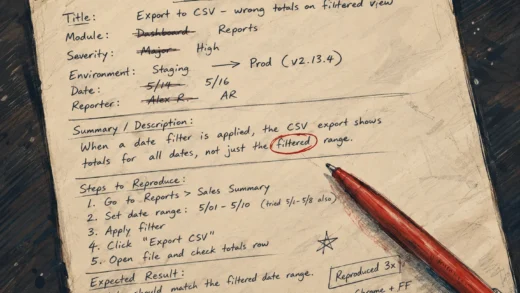
When you find bugs, file them. I wrote about how to write a functional bug report here. Not every bug needs to be fixed immediately — that’s a product decision. As a default rule, bugs that break acceptance criteria go straight into the sprint until product says otherwise. If something was in the AC, it was required. That’s a reasonable starting point. Everything else goes through prioritization. When bugs are fixed, retest them and run a targeted regression around the change.
Before You Ship
When all the tickets are tested individually and you’re approaching a release, run a final regression. Not a full regression of everything in your test suite, but a targeted one covering the new features and anything adjacent that could have been disturbed by the sum of all the changes together.
If you have a staging environment, this is where you test the full integrated build before it goes to production. You don’t have to do a deep regression here. Just a sanity check that the new features were deployed will test whether the deployment was successful or not. If your environments differ enough from production, then maybe it’s worth doing a deeper regression. Otherwise, separate deep AC and scenario testing on QA with deployment testing on staging. It won’t catch everything, but it gives you real confidence — not just feature-by-feature confidence — that the deployment isn’t going to blow up.
One question that comes up here: does QA sign off on the release? I’d push back on making that a hard rule. If QA owns the go/no-go, product and engineering stop owning quality. And when something goes wrong in production, it lands on you. That’s not a dynamic you want to set up.
What makes more sense is a shared definition of “ready to ship” that the whole team agrees on. If your team wants something concrete, here’s a reasonable starting point: all ACs pass for high-priority features, no critical severity bugs are open, and a smoke test of your business-critical flows passes. That’s a team standard that everyone owns together.
On Tools
For test case management, you want something you can organize into suites and track pass/fail runs. Any dedicated tool is better than nothing, and there’s no excuse not to have one because free options exist. Qase and Tuskr both have free tiers that are more than enough for a solo QA at an early-stage company. If your company won’t spring for even that, Google Sheets works. It’s tedious, but the practice matters more than the tool. Set up a sheet, organize tests into folders by feature area, add a column for pass/fail, and track your runs there. You can upgrade later.
For bug reporting and ticket communication, you’re using whatever the engineering team already uses. Leave your questions there. File bugs there. Keep everything visible to the people who need to act on it.
This Process Will Not Be Perfect
It’ll have gaps. Bugs will still slip through. You’ll test something and miss a scenario you wish you’d caught. That’s not failure though. That’s how QA works at every company, including the ones that have been at it for years. As long as you’re consistently sticking to the process, you can do a root cause analysis on any bug that leaks — to production, to staging, or even to QA — and patch up the part of the process that let it through. The next sprint starts with a harder process than the last one.
The point of this process isn’t to catch every single bug. It’s to catch the category of bugs that matter most at this stage, do it consistently, and give the team enough visibility into risk that they can make good decisions. That’s what a QA process is for.
Build the imperfect one. Run it. Improve it as you learn more about your product and your team. The perfect version doesn’t exist anyway.