
How To Write a Sprint Test Plan
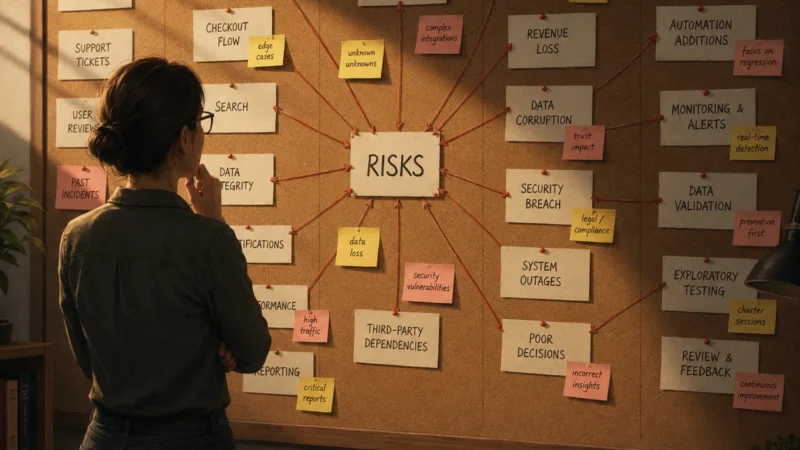
Most test plans I’ve seen start with scope before talking about risks. Here’s what we’ll test, here’s what we won’t. Which is fine, except it skips the question that actually drives all of it: what are the risks we’re trying to protect against?
I write sprint-level test plans one per sprint, covering everything QA is responsible for in that three week window. I’ll cover project and feature-level plans in separate posts — this one is sprint level. And the thing I’ve learned is that the structure matters less than the order you think through it. If you start with scope, you’re guessing. If you start with risks, the scope writes itself.
Here’s how I approach it.
Start With the Sprint Goals
Before anything else, you need to know what the sprint is actually trying to accomplish. What features are shipping? What’s being built but flagged off? What does the business need to be true by the end of this sprint?
This sounds obvious, but QA doesn’t always have this picture clearly. Sometimes you’re handed a list of tickets without much context for why they’re being done together or what success looks like. Getting clear on the goals first means your entire plan is oriented around what actually matters and not just what got assigned.
I remember one sprint where I was testing a very important feature around custom roles and permissions that would have broad effect on every aspect of the application. I had hundreds of test cases prepared to raise any functional issues with the feature and I was spending a lot of time testing up until the last few days of the sprint when I finally learned from product that they were okay not releasing it that sprint. That would have been helpful to know at the beginning. If I had known I could have prioritized other risks to mitigate rather than spend all this time on something that was lower risk and priority.
Risks Before Scope
Once you know the goals, think about what could go wrong. I put risks front and center in my test plans, before scope, before anything else. A lot of templates bury this section at the end or skip it entirely. I think that’s backwards.
The risks I’m almost always thinking about for any sprint:
- Requirements ambiguity. Are the requirements clear enough that a developer won’t misinterpret them? Are there scenarios nobody has considered yet that conflict with how the app currently works? This gets mitigated by QA reviewing requirements before development starts — flagging anything that would lead to the wrong thing getting built.
- Functional correctness. Do the features work as described in the requirements? Are the acceptance criteria actually met? This gets mitigated through functional testing after implementation.
- Regression risk. Will the new implementation break something that was already working? This gets mitigated by identifying which areas of the app are most likely affected and running regression tests against them. Sharing that list with engineers early means they can factor it into their own code reviews.
You can also put timeline risks here and how you would mitigate them. This section is more general — the strategy. Scope and resources will be more tactical about how you actually execute against it.
Not every sprint has the same risk profile. A sprint that’s mostly backend infrastructure changes has different regression concerns than one introducing a new checkout flow. You may focus more on API regression testing than UI. The risks section is where you make that call explicitly rather than just running the same tests every time.
Scope Follows From Risk
Once the risks are on the table, the scope section is mostly just answering: what testing activities will we perform to address each one?
Functional testing covers the tickets. Regression testing covers the areas most likely affected by the implementation. Beyond that, you’re making judgment calls: is there meaningful cross-browser risk this sprint? Mobile UI regression risk? Accessibility concerns on any of the new work? Performance risk worth running a load test against?
There was a sprint I remember where there was an invisible change — an update to a Python package that would have major impact on every single part of the application. Our QA team saw that there was a “no QA required” label on the ticket and didn’t bother considering the effects it would have on the end user. It turned out that such a change warranted performance regression testing, because the site ended up slowing way down and would have affected a looming course launch that would have caused major crashes.
You may have noticed that the risks and scope I focused on are heavily functional. That’s because my team hasn’t matured to the point where we could effectively raise accessibility, performance, or security risks. Your team will have to assess what risks you can actually tackle. The point is that every item in scope should connect back to a risk you identified. If it doesn’t, it probably doesn’t need to be there.
What Won’t Be Tested
This section matters just as much as the in scope section, because it gives stakeholders an understanding of the risks they may have to accept. Sometimes there isn’t enough time to cover everything. Sometimes product or engineering has explicitly said certain things don’t need testing this sprint. Sometimes the team just doesn’t have the capability right now.
Whatever the reason, name it. And then name the gap it leaves. If you’re skipping regression testing on mobile because you don’t have capacity, say that, and say what risk that leaves unmitigated. This isn’t about covering yourself. It’s about giving stakeholders an honest picture so they can decide whether that gap is acceptable.
Resources and Capacity
The last thing I look at is who’s actually available. Who’s on the team this sprint, what does their PTO look like, are there any partial sprints to account for?
Comparing available capacity against the estimated testing workload tells you whether the plan is realistic. If the sprint is overloaded relative to who’s available, that’s a conversation to have with product and engineering before the sprint starts, not something to silently absorb and then scramble through at the end.
Speaking of which: this whole plan only works if QA has time to write it before the sprint kicks off. That’s not always the reality. If your team is still catching up on last sprint’s testing when planning starts, there’s a process problem that a better test plan template won’t fix. That’s a bigger conversation and one I’ll come back to in another post.
The Point of All This
A sprint test plan isn’t just bureaucratic documentation or a checklist to hand your team. It’s how you think through what QA is protecting against in a specific window of time, and communicate that to the people who need to know.
Start with goals. Surface the risks. Let the scope follow from that. Be honest about what you’re not covering and why. Know if you have the people to actually do it.
That’s it. The template is just a container for that thinking. How detailed it gets depends on your team. Some keep the plan as a lightweight strategy doc and link out to test runs in their test management tool for the specifics. For sprint level test plans I prefer one pagers if possible. Either way works. What matters is that someone thought through the risks and wrote it down somewhere the team can see and contribute to. The format is secondary.
You can write it in a Google Doc or a spreadsheet. I’ve used both. Below is an example of what one looks like in practice.
Example: Sprint 24 Test Plan
Sprint Goals
This sprint is focused on shipping two things. First, a redesigned checkout flow for flight booking — updated form layout, revised field validation, and a new order confirmation screen. Second, a custom roles and permissions feature that controls what actions different user types can take across the site. Roles and permissions will be built and tested this sprint but released behind a feature flag — it is not going out to users yet.
The business priority this sprint is the checkout flow. That’s what’s going live.
Risks & Mitigation
Requirements ambiguity. The custom roles and permissions feature has broad impact across the application. There are open questions about what each role should and shouldn’t be able to access in edge cases — for example, what happens when a user with a restricted role tries to access a booking they made before the role was applied? QA will review the requirements and acceptance criteria before development starts and flag anything unclear or conflicting with current app behavior.
Functional correctness. Both the checkout flow and the roles feature need to work as described in their acceptance criteria. The checkout flow is higher priority given it’s shipping this sprint. Roles and permissions functional testing will be scoped appropriately given the feature flag.
Regression risk. The checkout flow changes touch payment validation and order confirmation — areas that connect to booking history and user account state. There is meaningful regression risk to adjacent flows: viewing past bookings, re-booking, and account summary. The roles and permissions implementation may also affect navigation and page-level access controls across the site. QA will identify the affected areas early and share the regression scope with engineering so they can factor it into code review.
Timeline risk. Roles and permissions is a large feature with broad surface area. If tickets deploy late in the sprint, there may not be enough time to test it thoroughly. Given it’s behind a feature flag and not shipping to users, functional testing will be prioritized over exhaustive regression if time runs short. The checkout flow takes priority.
In Scope
Functional testing: All checkout flow tickets — form validation, field behavior, error states, order confirmation screen, and end-to-end booking completion. Roles and permissions tickets: creating roles, assigning permissions, applying roles to users, and verifying access control behavior matches the requirements.
Regression testing: Checkout-adjacent flows — past bookings, re-booking, account summary. Navigation and page access for roles that restrict visibility — spot check key pages to confirm nothing is broken for users without a role assigned.
Cross-browser testing: The checkout flow redesign includes layout changes. Chrome, Firefox, and Safari desktop. Mobile browser regression on Chrome iOS given the form layout changes.
Out of Scope
Performance testing. No infrastructure or backend changes this sprint that would warrant a load test. Accepted risk.
Accessibility testing. The checkout flow has new form fields. Accessibility regression is a known gap — we don’t currently have the tooling or process to cover this. Flagged as an accepted risk for this sprint.
Full regression of roles and permissions. Given the feature is behind a flag and not user-facing, exhaustive testing is out of scope. Core happy path and key access control scenarios only. Full regression will be planned for the sprint it ships.
Resources and Capacity
| Team Member | Availability | Notes |
|---|---|---|
| [QA Lead] | Full sprint | Owns checkout flow testing and test plan |
| [QA Engineer 1] | Full sprint | Owns roles and permissions testing |
| [QA Engineer 2] | 3 days | PTO Wednesday–Friday week 2 |
Estimated workload is medium-high given two feature tracks running in parallel. If tickets deploy late or QA Engineer 2’s absence creates a bottleneck on roles testing, checkout flow takes priority. Roles regression will be descoped before checkout regression.
If capacity becomes a concern mid-sprint, we’ll flag it to product and engineering before the end of sprint rather than after.